
Learning how to use time blocking for creative projects can completely transform the way you approach your side work, especially if you are the kind of maker, crafter or DIY enthusiast who constantly juggles multiple tasks, personal responsibilities, unpredictable schedules and the occasional creative surge that appears at the most inconvenient possible moment, making it difficult to finish what you start or maintain consistent progress across weeks and months.
Many creators feel overwhelmed not because they lack ideas or motivation, but because their time disappears into fragmented blocks full of interruptions, task switching and scattered focus that drain energy far more quickly than the creative work itself; this is why a structured time blocking method brings clarity, reduces stress and gives your creative process the protected attention it deserves without forcing you into rigid routines that stifle experimentation or spontaneity.
This long, detailed and highly actionable guide provides a realistic approach to time blocking for creative projects, explaining how to build weekly structures that still accommodate unexpected life events, how to plan blocks inside your calendar without overcommitting, how to set up focus rules that protect deep work, how to add flexible buffers that keep your maker schedule from falling apart and how to follow printable planning templates that you can copy directly into your notebook or digital calendar.
Why Time Blocking Works Especially Well for Side-Project Creators
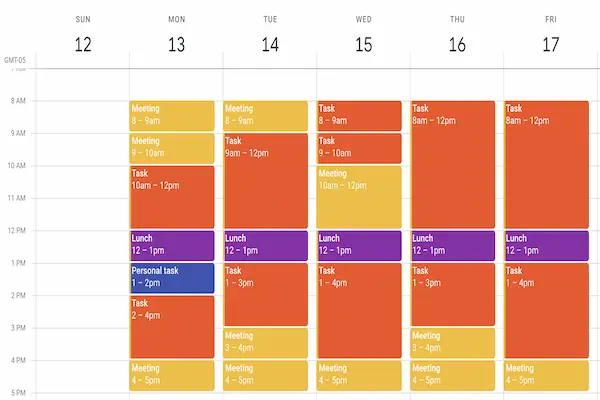
Understanding why time blocking is particularly effective for creative work begins with recognizing how fragile uninterrupted concentration can be, since creative output depends heavily on momentum, immersion and the mental space required for experimentation, problem solving and flow, all conditions that get destroyed by context switching, constant notifications or disorganized schedules.
Creators working on side projects after long workdays or busy family routines do not always have the luxury of long hours, so the goal becomes protecting smaller pockets of high-quality focus rather than wishing for impossible stretches of free time that never appear in real life; this makes the time blocking method an ideal solution because it enforces intentional boundaries and gives each task a dedicated space on the calendar instead of letting everything blend into an endless to-do list.
Because creative tasks often require warm-up time—mental preparation, reviewing previous notes, gathering materials or rekindling inspiration—time blocks help contain that overhead into predictable windows rather than allowing preparation to eat half the day, and this rhythm not only improves productivity but also reduces frustration by giving your mind a stable routine to work within.
Tools and Materials You Need to Implement Time Blocking for Creative Projects
Although time blocking can be done with any calendar, notebook or schedule, gathering a few simple tools makes the entire process smoother, clearer and easier to maintain consistently.
Basic Tools for Time Blocking Method Success
- Notebook or bullet journal to sketch weekly templates and task lists.
- Digital calendar such as the one already available on your phone or computer.
- Colored pens or highlighters for visual block separation.
- Timer or focus app for deep work sessions.
- Sticky notes for quick rearranging of tasks within blocks.
Combining analog and digital tools often gives creators the sweet spot between flexibility and structure, allowing rapid brainstorming on paper with clear schedule enforcement inside the calendar.
Optional Tools for More Organized Time Blocking
- Whiteboard or wall planner for visual overviews.
- Tab dividers for categorizing creative projects.
- Printer for turning templates into reusable worksheets.
- Desk timer for enforcing break and work intervals.
- Task batching sheets for grouping related actions into blocks.
While optional, these tools help reinforce time blocking for creative projects, especially when managing multiple overlapping DIY tasks such as designing, assembling, photographing, editing or prepping materials.
How to Start Building Your Time Blocking Framework
Building a time blocking method that works long term begins by understanding your real schedule, not the idealized one you imagine, because time blocking fails when you underestimate your commitments or overestimate your energy; therefore, the first step is creating a clear, honest view of your week before deciding where creative work fits.
Step 1: Map Your Existing Weekly Commitments
- List non-negotiable commitments such as full-time work, commuting, childcare, meals and errands.
- Mark optional but important routines such as exercise, rest periods and household tasks.
- Identify recurring small obligations that often eat time unexpectedly, like email or messaging.
- Group these responsibilities into categories such as personal, professional, family or administrative.
- Calculate how many hours remain for creative work within realistic boundaries.
This step reveals the true shape of your schedule and helps avoid overcommitting to blocks you cannot maintain.
Step 2: Define Clear Creative Project Categories
- Design phase tasks such as sketching, drafting, concept outlines.
- Hands-on making tasks such as crafting, building, assembling.
- Editing or refining tasks like revising drafts or adjusting builds.
- Administrative tasks such as budgeting, material sourcing or inventory.
- Publishing or sharing tasks including photographing work, uploading, posting or documenting.
Having categories makes it easier to batch similar actions into blocks, reducing context switching and increasing focus.
Step 3: Choose Time Block Length and Structure
- Select block durations that match your energy—many creators prefer 60, 90 or 120 minutes.
- Create small micro-blocks (20–30 minutes) for admin or prep work.
- Use larger blocks only for creative deep work sessions that require full immersion.
- Balance intense blocks with lighter ones to maintain momentum across the week.
- Shift block placement based on natural energy peaks (mornings for some, evenings for others).
Block length should feel harmonious, not burdensome; choose durations you can maintain consistently.
Building Your Weekly Time Blocking Template
Constructing a weekly template gives your maker schedule coherence, because instead of improvising each day, you follow a predictable rhythm that guides your creative flow without locking you into rigid routines.
Sample Weekly Template for Creative Work
Below is an example structure that you can copy or adjust according to your personal schedule.
- Monday: 60-minute planning block + 90-minute making block.
- Tuesday: 90-minute deep work block + 30-minute admin block.
- Wednesday: 60-minute creative drafting block + 60-minute assembly block.
- Thursday: 90-minute editing block + 30-minute cleanup or prep block.
- Friday: 120-minute maker session for hands-on work.
- Saturday: Flexible morning block for experimentation.
- Sunday: Rest, review and reset for the upcoming week.
This template ensures that every key phase of the creative process receives dedicated attention.
Tips for Adjusting the Template to Reality
- Shorten blocks if your weekday evenings are too unpredictable.
- Move heavy creative work to weekends if your job drains weekday energy.
- Keep admin tasks on lighter days so you never overload yourself.
- Use backup blocks on weekends to catch up when a weekday slips.
- Rebuild your template monthly as projects evolve.
Focus Rules That Strengthen Your Time Blocks
Following a time blocking method effectively depends on how you protect each block, because even the most beautifully organized schedule collapses if you treat blocks as optional or allow interruptions to invade your deep work sessions.
Essential Focus Rules for Creative Projects
- Silence notifications across all devices during deep work.
- Prepare all materials before the block starts.
- Communicate boundaries to family or roommates when necessary.
- Use a timer to anchor your attention within the block.
- Start with a warm-up ritual such as reviewing notes or checking progress.
Additional Productivity Tips for Maintaining Focus
- Batch similar creative tasks into the same block to reduce mental transition costs.
- Create a short checklist at the start of the block to guide your progress.
- Limit decision making during the block by planning your tasks earlier.
- Use the first five minutes to review your last session and the final five to summarize next steps.
- Take micro-breaks if concentration wanes, but always return promptly.
How to Add Buffer Blocks to Your Maker Schedule
Including buffers in your time blocking structure is essential for realistic planning, because creative work tends to take longer than expected, especially when projects require experimentation, problem solving or multiple material tests.
Types of Buffers You Should Add
- Cushion Buffers: extra minutes placed directly after a creative block.
- Weekly Flex Buffers: one larger window to handle overdue tasks.
- Unexpected Delay Buffers: space reserved for mistakes, revisions or supply issues.
- Energy Buffers: lighter blocks after heavy focus sessions to rest your mind.
- Review Buffers: time for summarizing progress and adjusting next steps.
How Buffers Help Keep Your Week on Track
- Prevent spillover from overwhelming future blocks.
- Maintain flexibility without destroying your weekly structure.
- Improve consistency by reducing stress when projects require more time.
- Protect evenings and weekends from exhaustion.
- Allow creative momentum to flow naturally rather than be forced.
Printable Time Blocking Planner Template for Creative Projects
This simple printable style layout can be copied into your notebook, planner or digital tool to give your maker schedule a clear weekly structure that includes time blocks, focus rules and buffer sections for a balanced creative routine.
Weekly Planner Layout
- Top Section: Weekly goals, must-finish tasks, project status notes.
- Left Column: Daily schedule with hour-by-hour or block-by-block grid.
- Right Column: Notes for materials, ideas, obstacles or task batching.
- Footer: Weekly reflection questions and next steps.
Daily Block Structure Example
- Creative Deep Work Block.
- Making or Assembly Block.
- Admin and Organization Block.
- Break or Rest Block.
- Buffer or Catch-Up Block.
Common Mistakes in Time Blocking for Creative Projects
Understanding the most common time blocking mistakes prevents frustration and helps build habits that stick, especially when balancing creative work with a busy life.
Mistake 1: Planning Too Much in a Single Block
- Choose one major task per block.
- Break complex tasks into smaller parts.
- Avoid stuffing admin tasks into deep work windows.
Mistake 2: Ignoring the Maker Schedule Reality
- Creative work requires warm-up time; plan it deliberately.
- Switching materials mid-block can break focus.
- Maker energy often peaks at unusual times; honor that rhythm.
Mistake 3: Leaving No Room for Fatigue
- Never plan back-to-back intense blocks.
- Add micro breaks between transitions.
- Use low-energy blocks to handle routine tasks.
Mistake 4: Failing to Reset the Schedule Weekly
- Review unfinished tasks every Sunday.
- Rebuild the template based on project progress.
- Adjust block lengths according to energy patterns.
How to Use Time Blocking for Large Creative Projects
Applying time blocking for creative projects that span several weeks or months requires careful planning so the structure remains supportive rather than restrictive.
Breaking Big Projects into Stages
- Vision or concept phase.
- Design and planning phase.
- Material gathering and preparation phase.
- Making or building phase.
- Editing, testing or refining phase.
- Finishing or publishing phase.
Assigning Blocks to Each Stage
- Use larger blocks for hands-on building sessions.
- Place design blocks earlier in the week when energy is higher.
- Schedule admin blocks after heavy creative days to conserve energy.
- Add weekend blocks for deep immersion sessions.
- Use flex blocks when stages require unexpected revisions.
Final Thoughts: Mastering Time Blocking for Creative Freedom
Implementing time blocking for creative projects creates a powerful blend of structure and freedom, giving your maker schedule the support it needs to transform ideas into finished work without losing spontaneity, joy or experimentation along the way.
Once you become comfortable assigning tasks to blocks, adjusting buffers, setting focus rules and following weekly templates, creative momentum becomes natural rather than forced, allowing your side projects to evolve into consistent accomplishments even inside a busy, unpredictable life.
Every new week becomes an opportunity to refine your structure, balance your commitments more intelligently and create with intention, turning what once felt overwhelming into a steady rhythm of progress and satisfaction.