
Beginning your journey with personal productivity becomes significantly more approachable when you explore a starter guide to personal kanban that breaks down every part of the process into clear, visual and motivating explanations designed especially for learners who want a simple system that makes sense immediately, does not require complicated software, and transforms overwhelming to-do lists into structured flows of action that reduce stress rather than adding more.
Since personal kanban is based on two core principles—visualizing work and limiting work in progress—understanding how these principles function in daily life allows you to turn intention into momentum, making commitments feel manageable and priorities more visible, even if you are juggling career responsibilities, household tasks, personal growth goals or creative projects with competing demands on your attention.
Because traditional productivity systems often become overloaded with rules or complex decision structures, many people find themselves abandoning them after initial excitement fades; however, personal kanban stands out for its simplicity, flexibility and adaptability to different lifestyles, making it a particularly powerful tool for beginners who prefer straightforward structures that grow naturally alongside their habits.
Using a visual board not only clarifies what needs to be done but also reveals where your energy is being spent and how tasks move through stages, turning intangible commitments into visible progress that builds motivation. This starter guide to personal kanban offers long, detailed explanations, plenty of examples, a clear breakdown of WIP limits, weekly review routines and printable-style cards, all designed to help you build a board that supports your flow and reduces overwhelm.
What Personal Kanban Is and Why It Works
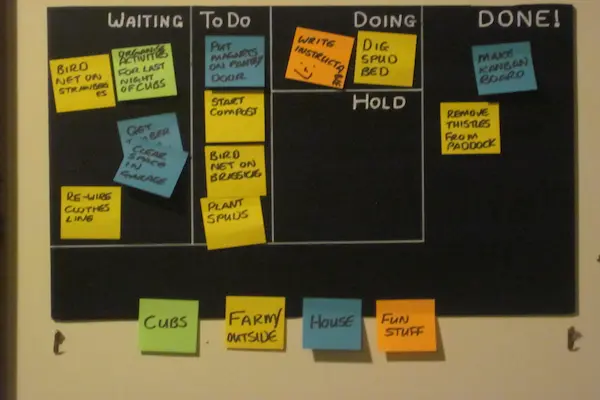
Personal kanban is a lightweight productivity method based on visualizing your tasks and controlling how much you do at once. The system gives you a flexible workflow that adapts to your day rather than forcing your day into rigid scheduling structures. By seeing your tasks move across stages, you begin to understand not only what you must do but also how you work, where bottlenecks appear, where your energy drops, and how often you overload yourself unintentionally—insights that make meaningful productivity improvement much easier.
Core Principles of Personal Kanban
- Visualize Work: turning invisible demands into visible tasks so you always understand what is on your plate.
- Limit Work in Progress (WIP): ensuring you never overwhelm yourself, building focus and flow by reducing task-switching.
Why Personal Kanban Helps Beginners
- It removes guesswork and reveals actual workload clearly.
- It reduces cognitive load by keeping tasks in an external system.
- It adapts to personal preferences instead of demanding strict compliance.
- It builds sustainable habits through small visual wins.
- It supports long-term consistency by remaining simple even as life changes.
Board Setup: How to Build Your First Personal Kanban Board
A personal kanban board can be as simple as three columns on a whiteboard, journal page, corkboard or sheet of paper. The board becomes your visual workspace, showing tasks in different stages of completion. Starting with a basic structure keeps things intuitive so you learn by doing rather than getting stuck in design choices that slow you down.
Basic Three-Column Layout
- Backlog: where all future or optional tasks live.
- Doing: where your active tasks move when you’re working on them.
- Done: where completed tasks go as visible evidence of progress.
Why These Columns Matter
- The backlog stores everything so your mind stays clear.
- The doing column limits multitasking and maintains focus.
- The done column creates motivation through visible achievements.
Step-by-Step Instructions for Setting Up Your Board
Following a clear setup sequence helps you create a personal kanban board that feels actionable immediately, rather than getting stuck deciding what tasks qualify or how to categorize everything.
Setup Steps
- Choose a physical or digital board format that feels natural and easy to maintain daily.
- Create the three core columns: Backlog, Doing, Done.
- Gather every pending task from your mind, notebook, email and apps.
- Write each task on a separate card or sticky note.
- Place all tasks—without filtering—into the backlog column.
- Select 2–3 tasks that matter most today and move them to the Doing column.
- Leave every other task in the backlog until the Doing column clears.
Common Mistakes to Avoid
- Starting with too many columns before understanding the basics.
- Adding too many tasks at once and overloading the Doing column.
- Skipping the backlog and trying to act from memory.
- Ignoring WIP limits, which leads to lost focus.
- Rewriting tasks excessively instead of simply updating movement.
Examples of Personal Kanban Boards for Different Life Areas
Seeing examples helps you visualize how flexible the system actually is. Personal kanban can be adapted to nearly any category of life, because tasks always move between intention, action and completion regardless of subject matter.
Example 1: Kanban for Career Tasks
- Backlog: certification research, portfolio updates, job application drafts.
- Doing: one application, one resume edit, one portfolio revision.
- Done: finalized resume, updated LinkedIn summary, completed project samples.
Example 2: Kanban for Household Organization
- Backlog: pantry cleanup, laundry rotation, budget check, appointment scheduling.
- Doing: one cleaning task, one weekly prep task.
- Done: weekly dishes cycle, inbox organization, grocery list update.
Example 3: Kanban for Personal Growth
- Backlog: journaling ideas, meditation videos, reading goals, hobby sessions.
- Doing: 1–2 self-care tasks for the day.
- Done: completed meditation sessions, read chapters, created sketches.
WIP Limits: The Heart of Personal Kanban
WIP limits—limits on Work In Progress—prevent overwhelm and maintain flow by ensuring you never take on more than you can handle at one time. WIP limits are the most important part of personal kanban because they stop multitasking, encourage finishing rather than starting and reveal your real capacity over time.
Why WIP Limits Matter
- They reduce stress by limiting task volume in the Doing column.
- They help you notice bottlenecks early.
- They train you to finish what you start.
- They make progress measurable and predictable.
- They show whether tasks are too large and need breaking down.
How to Choose Your WIP Limit
- Begin with a WIP limit of 2 or 3 tasks for the Doing column.
- Observe how your energy shifts when you increase or decrease the limit.
- Identify tasks that consistently block progress.
- Lower the limit temporarily during busy or stressful weeks.
- Increase only when you demonstrate consistent completion.
Signs You Need to Reduce Your WIP Limit
- You feel stuck or scattered throughout the day.
- Your Doing column grows larger than your Done column.
- You frequently forget which task you were working on.
- You abandon tasks halfway through.
- You experience decision fatigue choosing what to do next.
Building Flow with Personal Kanban
Flow occurs when you work with calm, confidence and sustained focus, and personal kanban supports this by giving clear pathways from intention to completion. Flow emerges naturally when tasks are visible but not overwhelming, when WIP limits are low, and when tasks move smoothly through the board.
How to Encourage Flow
- Break complex tasks into smaller actions so progress becomes tangible.
- Use warm-up tasks—one quick win before heavier work begins.
- Keep your Doing column visible and distraction-free.
- End each day with a Done column review for psychological closure.
- Use weekly reviews to reset, refresh and realign priorities.
Weekly Review: The Reset Ritual for Personal Kanban
The weekly review is essential for maintaining a productive and responsive personal kanban board because it clears mental clutter, clarifies priorities, and ensures your backlog remains organized rather than chaotic. A review is not busywork; it is maintenance that sustains clarity and supports long-term momentum.
Weekly Review Steps
- Review everything in the Done column and note accomplishments.
- Move any lingering tasks from Doing back to Backlog if not active.
- Delete or archive tasks that no longer matter.
- Sort the backlog into high, medium and low importance clusters.
- Select tasks for the next week based on energy, goals and commitments.
- Reset your WIP limit if needed.
- Prepare new cards for upcoming tasks.
Questions to Ask During the Weekly Review
- Which tasks took longer than expected, and why?
- Where did bottlenecks appear?
- What did I learn about my working style?
- Which tasks energized me the most?
- What should I stop doing next week?
Printable Kanban Cards
Using simple, printable-style cards enhances clarity, reinforces prioritization and keeps your board visually clean. These templates contain everything you need to organize tasks without overthinking design.
Standard Task Card Template
- Task: ___________________________
- Category: ________________________
- Priority: High / Medium / Low
- Estimated Time: _________________
- Notes: __________________________
Quick-Task Micro Card
- Task: ___________________________
- 5-Minute Action: ________________
Project-Level Card Template
- Project: ________________________
- Next 3 Actions: _________________
- Dependencies: _________________
- Deadline: ______________________
Advanced Options for Expanding Your Personal Kanban
After mastering the basics, you may choose to add complexity gradually to support larger projects, deeper prioritization or multi-person collaboration, but only once the basic system feels solid.
Optional Enhancements
- Add categories (Work, Personal, Learning, Health).
- Create swimlanes for parallel workflows.
- Use color-coded cards for different energy levels.
- Develop a “Waiting” column to track stalled tasks.
- Add a “Today” lane for maximum clarity.
Final Checklist for Personal Kanban Beginners
- Build a three-column board before adding complexity.
- Write every task on its own card.
- Choose a WIP limit of 2–3 items.
- Review tasks weekly to refresh clarity.
- Break big tasks into smaller actions.
- Celebrate filled Done columns for motivation.
- Adjust your system rather than abandoning it when life shifts.