
Designing weekly layouts can feel both exciting and slightly overwhelming, especially when you want your bullet journal to remain minimal, visually calm, highly functional and flexible enough to fit a week filled with classes, freelancing tasks, deadlines, routines, appointments and those unpredictable moments when work and life overlap in unexpected ways, making it essential to rely on a layout that saves time rather than consuming it.
Choosing the right weekly structuring method often determines whether your productivity journal becomes a tool that supports your days with clarity or a notebook filled with spreads that look beautiful yet take too long to maintain, which is why exploring a wide range of bullet journal weekly spread ideas helps you discover what genuinely fits your workflow instead of forcing yourself into a layout that doesn’t match your real schedule.
This extensive guide brings ten practical bujo weekly layouts explained in detail, showing when to use each one, how to adjust them based on your workload, which trackers combine well with them, how to keep the design minimal without sacrificing structure and how to use time-saving techniques so you never spend more minutes drawing than you do actually planning your week.
At the end, you will also find a printable-style grid template described entirely in text so you can recreate it in your notebook instantly, along with suggestions for micro-trackers, functional icons, workflow groupings and clever ways to optimize weekly pages for students, freelancers, multitaskers and creatives who need clarity more than decoration.
Bullet Journal Weekly Spread Ideas: Why Weekly Layouts Matter
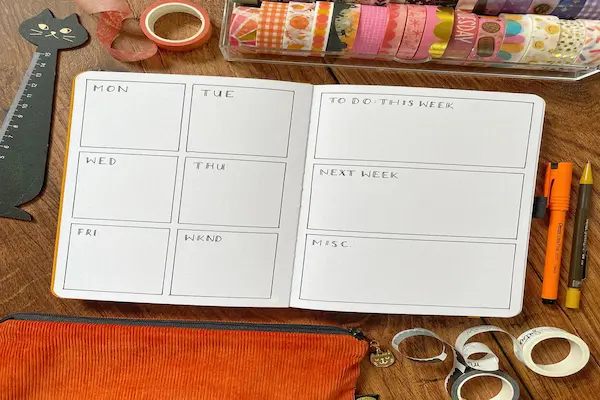
A weekly spread becomes the bridge between your monthly overview and your daily logs, giving you structure without the rigidity of a preprinted planner and offering an adaptable space where appointments, habits, tasks, academic deadlines, project steps and personal routines can live together in a balanced arrangement that saves time and reduces mental clutter.
Rather than relying solely on daily logs that can expand unpredictably or monthly logs that offer limited detail, a weekly layout creates a comfortable midpoint where you can see everything that matters across seven days, helping you anticipate heavy workloads, shift tasks strategically and reduce stress through intentional planning.
Using a consistent weekly layout also brings rhythm to your bullet journal, allowing you to become faster at setting up new spreads because your brain gradually memorizes helpful patterns, making your creative routine minimal, functional and efficient enough for a busy student or freelancer.
Tools You Need for Fast and Minimal Weekly Layouts
Creating clean and efficient weekly spreads requires only a few tools, since focusing on simplicity ensures that your bullet journal remains quick to update even during your busiest weeks.
Minimal Tools Recommended
- One pen with a steady ink flow, preferably black for consistency.
- A single accent marker or mildliner for headings and highlights.
- A straightedge or ruler to create clean lines without wasted time.
- Small sticky notes for shifting tasks effortlessly between days.
- An optional fine-tip pen for small trackers and tiny icons.
By limiting your tools, you simplify the creation process and ensure your bujo weekly layouts stay clean and practical rather than overly decorative or time-consuming.
Ten Bullet Journal Weekly Spread Ideas
The ten layouts below offer different approaches depending on your workload, personal rhythm, visual preferences and space needs, giving you a complete range of minimal spreads designed to save time while enhancing clarity.
1. Classic Horizontal Weekly Layout
The classic horizontal layout divides the page into equal sections for each day, offering a familiar planner feel while retaining the flexibility of bullet journaling.
- Each day receives a horizontal slice of the page.
- Ideal for students managing assignments and daily class notes.
- Excellent for to-do lists that stay roughly the same size every day.
When to Use
This layout works beautifully when your tasks are evenly spread throughout the week and you prefer writing short, simple lists without extensive structuring.
2. Vertical Columns Weekly Spread
Vertical columns create a clean, linear design that mirrors digital calendars, making it perfect for freelancers needing hourly breakdowns or schedule spacing without drawing cumbersome grids.
- Seven narrow columns across two pages.
- Room for meetings, deadlines, and time blocks.
- Saves time because lines stay simple and repetitive.
When to Use
This layout fits well when your schedule is time-sensitive or when you need to batch tasks for business, school or content creation.
3. Minimal Dutch Door Layout
A Dutch door weekly spread uses cut-out sections that reveal parts of the previous or next page, giving you more space for notes and trackers while still reducing setup time because only some parts of the spread need to be redrawn weekly.
- Central flaps for each day of the week.
- Side sections hosting habit trackers and weekly goals.
- Perfect for people who like compact layouts with extra space.
When to Use
This layout is ideal when you need habit space, project lists and weekly focus areas without consuming an entire two-page spread every week.
4. Time-Block Grid Layout
The time-block grid layout borrows ideas from productivity systems that emphasize grouping similar tasks, allowing you to divide your weekly spread into broad categories rather than daily boxes, making it extremely efficient for people whose days vary in timing but retain consistent categories.
- Sections labeled Work, School, Personal, Projects and Errands.
- Seven days run across the top or bottom of the spread.
- Organizes your week by purpose rather than by date.
When to Use
This layout works well for freelancers, creators and multitaskers who juggle multiple areas of responsibility without needing strict day-specific planning.
5. Weekly Dashboard Layout
A dashboard weekly spread centers around a big-picture view of your tasks, habits, priorities and reminders, creating a layout that allows you to quickly capture everything important without drawing separate spaces for each day.
- A section for weekly goals.
- A list for priorities and deadlines.
- A micro-tracker for habits or routines.
- A notes box for reminders or ideas.
When to Use
This layout is great when your week doesn’t require intense daily breakdowns and when you prefer a functional summary rather than detailed scheduling.
6. Rolling Weekly Log
The rolling weekly log, inspired by rapid logging techniques, presents an open-ended weekly list where tasks flow naturally from one day to the next, eliminating rigid boxes and offering a highly flexible approach to planning.
- No predefined day sections, only a weekly heading.
- Tasks are added chronologically as the week progresses.
- Excellent for people who dislike fixed structures.
When to Use
This layout works best when your schedule changes frequently and when you need adaptation more than structure.
7. Alastair Weekly Method
The Alastair method creates a hybrid between list-based and box-based spreads, using initials or small columns to assign tasks to specific days without drawing full daily sections.
- A wide tasks column on the left side.
- Seven tiny columns for days of the week.
- Checkmarks or dots show when a task should occur.
When to Use
This layout is ideal for tracking deadlines across multiple days or when you prefer a weekly overview without writing repetitive daily headers.
8. Minimalist Three-Panel Layout
The three-panel weekly layout divides the spread into three functional sections: Important, Optional, and Scheduled, allowing you to keep the design minimal while maintaining clarity over priority and time-sensitive work.
- Reduces clutter by avoiding daily boxes entirely.
- Emphasizes what truly matters for the week.
- Works well for minimal spreads enthusiasts.
When to Use
This option is perfect if you want structure with strong prioritization but without detailed scheduling.
9. Student Weekly Layout
A student-focused layout supports class schedules, assignment trackers, study blocks and extracurricular tasks, offering separated columns for subjects or major academic responsibilities.
- Sections for each class or subject.
- Boxes for due dates and reading tasks.
- Habit trackers for study routines.
When to Use
This layout works best during academic semesters when balancing readings, assignments, projects and exam preparation.
10. Freelance Workflow Weekly Layout
A freelance-oriented spread divides your week into business tasks, client deadlines, content tasks, finance reminders and admin responsibilities, giving independent workers a clear visual system for balancing multiple clients or projects.
- Client columns for ongoing work.
- A financial reminders box for invoices and billing.
- A creative ideas panel for content planning.
- An admin zone for updates, emails and filings.
When to Use
This spread is ideal for freelancers juggling multiple streams of work with varying deadlines.
Time-Saving Tips for Faster Weekly Spread Setups
Creating minimal bujo layouts becomes easier when you rely on efficient routines and simple design principles that keep your spreads clear without requiring complex drawings, multiple pens or lengthy setup time.
Time-Saving Ideas
- Reuse the same layout style for at least one month to build muscle memory.
- Create reusable headers or labels that can be copied with simple strokes.
- Skip decorative borders and stick to clean, intentional lines.
- Batch-draw the next four weeks at once to avoid weekly setup pressure.
- Use simple icons such as dots, dashes and triangles to replace decorative symbols.
Micro-Trackers That Work Well in Weekly Spreads
Adding small, lightweight trackers enriches your weekly layout without overwhelming the page, giving you helpful insights into habits, routines and patterns that shape your productivity and well-being.
Weekly Micro-Tracker Ideas
- Water intake tracker with simple row of squares.
- Study hours mini-bar chart.
- Sleep quality tracker with dot rating.
- Steps or movement log with quick numbers.
- Creative time tracker for hobbies or content.
Printable-Style Weekly Grid Template
The following template can be drawn quickly in any bullet journal using only a ruler, providing a minimal and functional grid that works with most of the weekly layouts described above.
Grid Template Structure
- Divide two pages into four columns each (total eight).
- Reserve the first column for weekly priorities or notes.
- Use the remaining seven columns for each day of the week.
- Place a small blank row at the bottom for trackers.
- Leave a margin on the side for icons or color accents.
This grid saves time because it remains neutral, adaptable and easy to reuse weekly.
Choosing the Best Weekly Layout for Your Lifestyle
With many bullet journal weekly spread ideas available, finding the right one depends on your rhythm, obligations and personal focus, so evaluating your real needs ensures your layout supports rather than complicates your days.
Questions to Help You Decide
- Do I need space for appointments or just task lists?
- Are my days similar or dramatically different from one another?
- Do I prefer structured boxes or open lists?
- How much time do I want to spend drawing layouts weekly?
- Do my tasks require categories beyond daily breakdowns?
Final Checklist Before Creating Your Next Weekly Spread
Before beginning your next week, reviewing this final checklist ensures your layout remains functional, minimal and aligned with your real-life needs, giving you clarity and calm as you enter the new week.
- Confirm your chosen layout matches the workload of the upcoming week.
- Verify you have enough space for tasks, events and notes.
- Decide whether you need trackers or prefer simplicity.
- Write weekly goals before drawing the spread so you design with focus.
- Keep your tools nearby to minimize setup time.
- Use clean lines and minimal accents to maintain clarity.
- Leave room for unexpected tasks that may arise.
- Commit to reviewing the layout daily to keep it functional.